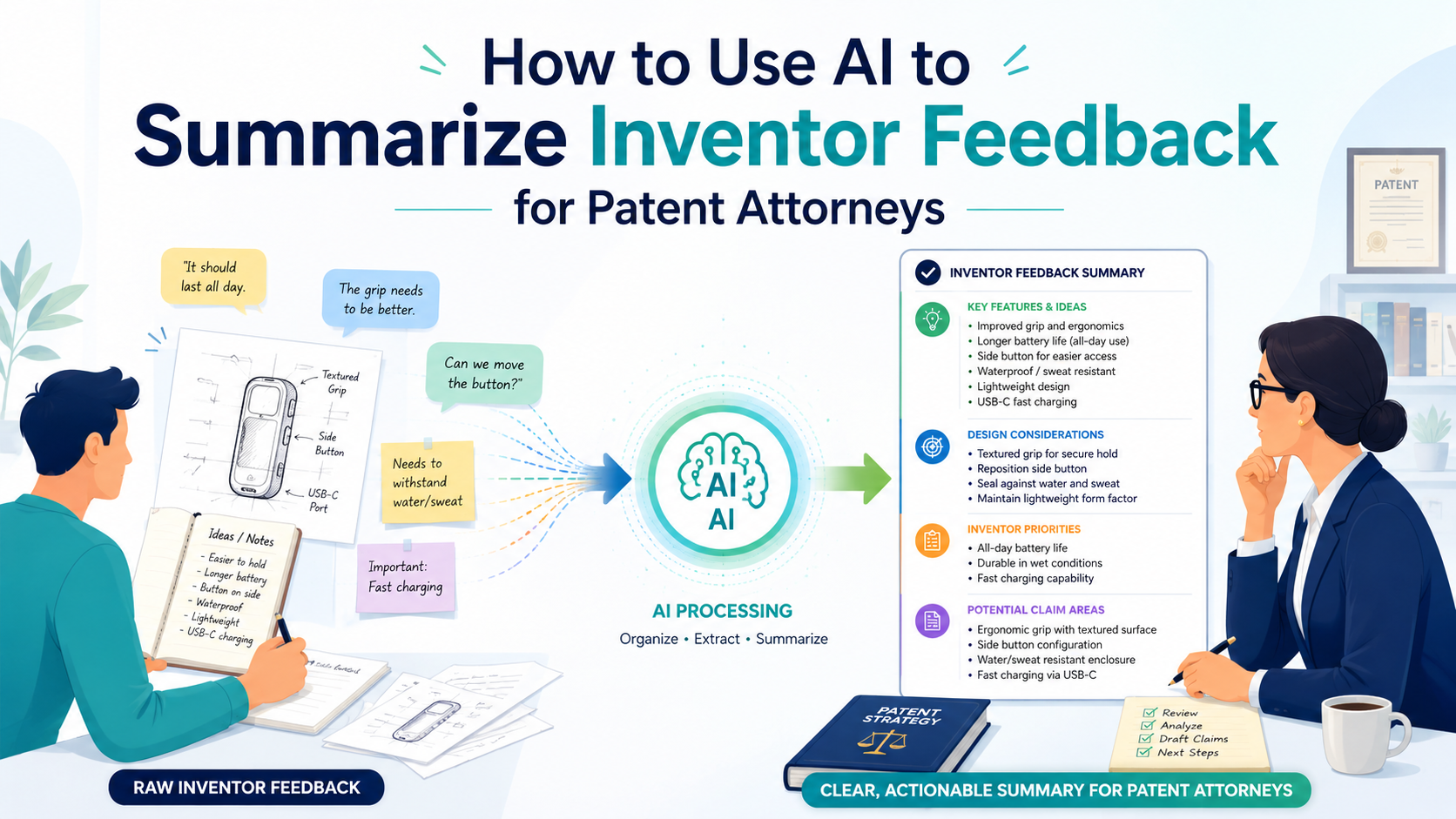
Inventor feedback is often messy. One founder leaves notes in Slack. One engineer sends a long email. Another adds comments inside a demo doc. A product lead records a call and says, “The real invention is the way we handle edge cases.” Then the patent attorney has to turn all of that into something clear, useful, and safe.
Start by Turning Raw Inventor Feedback Into One Clean Story
Inventor feedback becomes useful to a patent attorney only when it tells a clear story. Most teams do not start with a clean story.
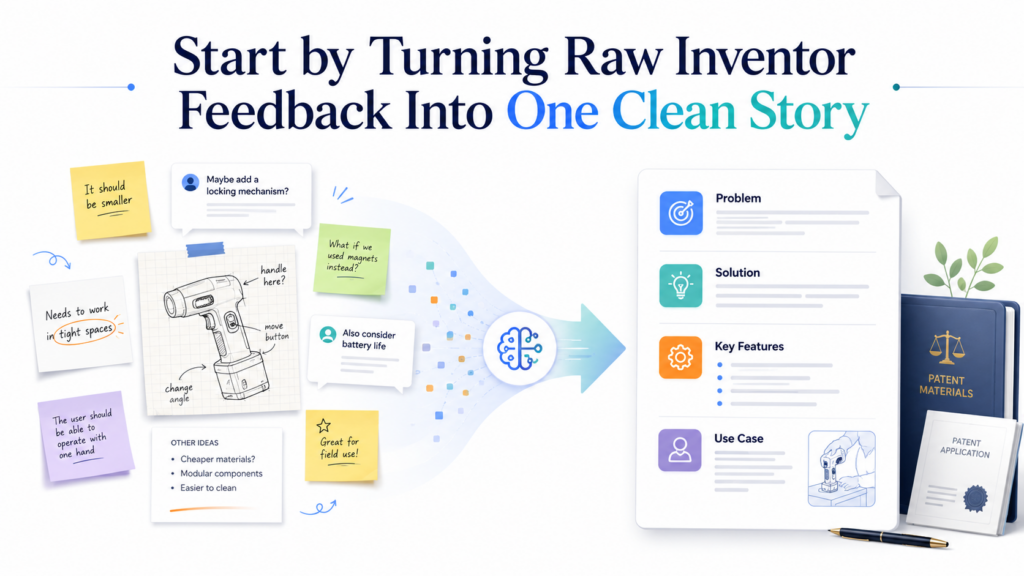
They start with scattered comments, rough notes, half-written ideas, demo feedback, code notes, customer pain points, and fast messages from people who are busy building. That is normal. In fact, that mess is often where the best patent ideas hide.
The first job of AI is not to “write the patent.” That is the wrong goal. The first job is to help the team see what the inventors are really saying.
It should pull together the raw feedback and shape it into a simple, clean summary that a patent attorney can review with less guesswork.
This is where many startups lose time. The attorney asks, “What changed?” The founder says, “We improved the model.” The engineer says, “It is really about the way we choose the fallback path.”
The product person says, “No, the key part is how the system decides when to ask for human review.” All of those comments may be useful, but they need to be placed into one clear picture.
The goal is not to make the feedback sound polished
A good AI summary should not make inventor feedback sound fancy. It should make it easier to understand.
Patent attorneys do not need marketing language. They need the real technical point, the reason it matters, and the parts that may be new.
The best summary keeps the inventor’s meaning intact. It should not turn a rough technical comment into a broad claim that sounds impressive but is not accurate.
That can create confusion. It can also make the attorney spend more time checking what the team actually meant.
A useful summary says, in plain terms, what the invention does, what problem it solves, how it works, what makes it different, and what parts are still unclear.
When AI is used this way, it becomes a helper that saves time without taking control away from the attorney or the inventor.
Keep the original voice close to the summary
The best AI workflow keeps the raw feedback nearby. The summary should never float alone.
Each important point should be tied back to the inventor’s actual words, notes, or files. This helps the attorney trust the summary and check the source fast.
For example, if an engineer says, “The system does not just rank results. It changes the scoring path based on live failure signals,” the AI summary should keep that meaning close.
It should not shrink it into “The system ranks results better.” That loses the invention.
A stronger summary would say that the system changes its scoring path when it detects live failure signals, instead of using one fixed ranking process.
That gives the attorney something real to explore. It also helps the team see that the possible invention may be in the adaptive scoring path, not just in the fact that results are ranked.
AI should separate signal from noise
Inventor feedback often includes many useful details, but not every detail belongs in the first summary. Some comments explain the product. Some explain customer value.
Some explain the technical method. Some are just side notes. AI can help group these ideas so the attorney does not have to dig through everything from scratch.
This is where the summary should be practical. It should show the main problem, the main solution, the key technical steps, and the parts that may need more review.
It should also flag repeated themes. If three inventors keep talking about the same system behavior, that is a strong sign the attorney should look closely at it.
PowerPatent is built around this kind of workflow: smart software to make the invention clear, plus real attorney oversight to make sure the work is handled with care.
That mix helps founders move faster without guessing their way through a high-stakes process. You can see how the process works here: https://powerpatent.com/how-it-works
The clean story should make the attorney’s next question obvious
A strong summary does not try to answer everything. It helps the attorney know what to ask next. That is the real win.
If the AI summary is done well, the attorney can quickly ask sharper questions. What was the old way? What exactly changed? Which step is required? Which step is optional? What happens if the model fails? What data is used? What part did the inventors design themselves? What part is off-the-shelf?
These questions matter because patents are built from clear details. The attorney needs to understand the invention deeply enough to protect it with care.
AI can speed up the path to that understanding, but only if the summary is honest, grounded, and easy to check.
Use AI to Capture the Real Invention Before the Team Forgets It
The hardest part of patent work is not always the law. Very often, the hardest part is memory. A founder ships a new feature on Monday. An engineer fixes a hard model issue on Wednesday.
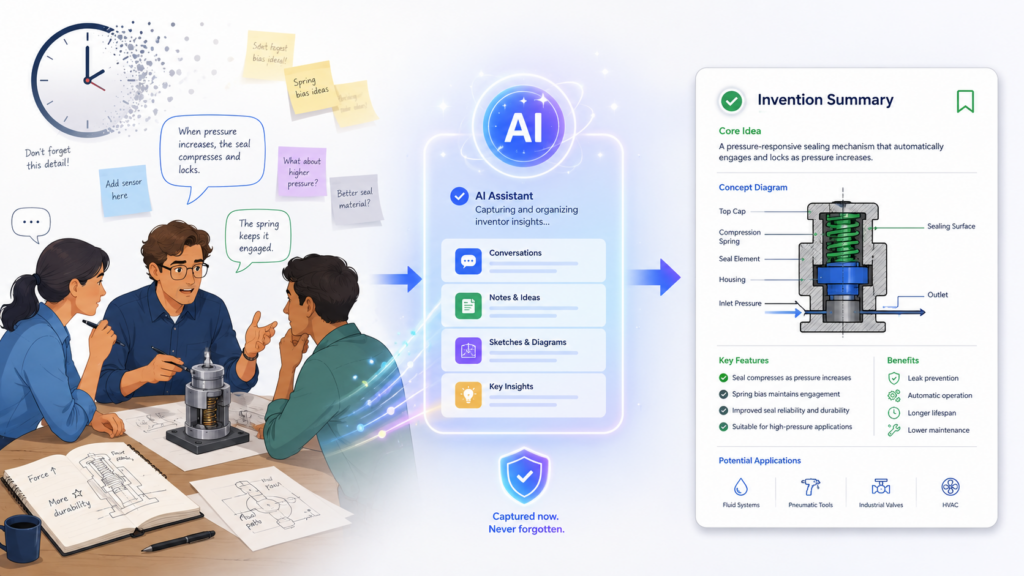
A customer call on Friday shows that the fix solves a bigger problem than expected. By the next week, the team has moved on. The small choices that made the invention special are already starting to fade.
That is why inventor feedback should be captured while the work is still fresh. AI can help because it can turn rough input into a clean record fast.
It can take call notes, meeting transcripts, Slack threads, GitHub comments, Jira tickets, product docs, and founder notes, then pull out the parts that may matter for the patent attorney.
The key is speed with control. You do not want the team waiting three weeks to write a perfect invention note. You also do not want AI making things up or guessing.
The right workflow is simple. Capture the inventor’s own words, ask AI to organize them, then have the inventors and attorney review the result.
Treat inventor feedback like a live asset, not a cleanup task
Most startups treat patent notes like homework. They wait until the attorney asks for details.
Then everyone tries to remember what happened. This is slow and risky because the best details are often buried in the moment of building.
A better way is to treat inventor feedback like an asset that grows with the product.
Every time the team solves a hard technical problem, improves a system, changes how data is handled, or builds a process that gives the company an edge, that feedback should be captured.
AI can make this easy. It can scan long notes and pull out possible invention signals. It can group comments by problem, solution, technical change, and business value. It can also flag gaps so the team knows what still needs to be explained.
The best feedback comes from the people closest to the build
Patent attorneys need clear input from inventors. But inventors are busy, and many do not know what details matter. Engineers may think a smart design choice is “just implementation.”
Founders may focus on the customer outcome and miss the technical path. Product leaders may describe the feature but not the system behavior behind it.
AI can help bridge that gap by turning everyday work into better invention input. For example, if an engineer writes, “We added a retry path so the model does not fail when the first signal is weak,” AI can ask for more detail.
What signal is weak? How does the system detect that? What retry path is used? What happens next? Was this done before? Why is this better?
These follow-up questions are not legal advice. They are invention discovery questions. They help the attorney get better facts faster.
Do not let AI flatten the technical detail
A common mistake is using AI to make feedback “simple” in a way that removes the important part.
Patent work needs simple language, but it also needs precise facts. If the AI summary becomes too broad, the attorney loses the trail.
For example, an inventor might say, “We reduce false alerts by using a two-stage check where the second model only runs when the first model sees a mismatch between expected and live data.”
A weak summary might say, “The invention improves alerts with AI.” That is not helpful. It hides the actual idea.
A better summary would explain that the system uses a first check to compare expected data with live data, then runs a second model only when a mismatch is found. That keeps the useful detail while staying easy to read.
Good summaries keep the invention sharp
The AI summary should not sound like a press release. It should sound like a clear handoff to a patent attorney. It should explain the technical move in plain words.
It should show where the move happens in the system. It should say why the move matters. It should also show what is known, what is assumed, and what needs inventor review.
This helps the attorney spend less time cleaning up vague input and more time thinking deeply about the invention. It also helps the startup avoid losing key details as the product changes.
This is where PowerPatent can help teams move with more confidence. The platform helps turn raw invention material into a cleaner process, while real patent attorneys stay involved where judgment matters.
That gives founders speed without handing the wheel to software alone. You can see how PowerPatent works here: https://powerpatent.com/how-it-works
Build a Simple AI Workflow That Patent Attorneys Can Trust
AI summaries are only useful if the patent attorney can trust them. Trust does not mean the attorney accepts every word. Trust means the summary is clear, sourced, easy to check, and honest about what it does not know.
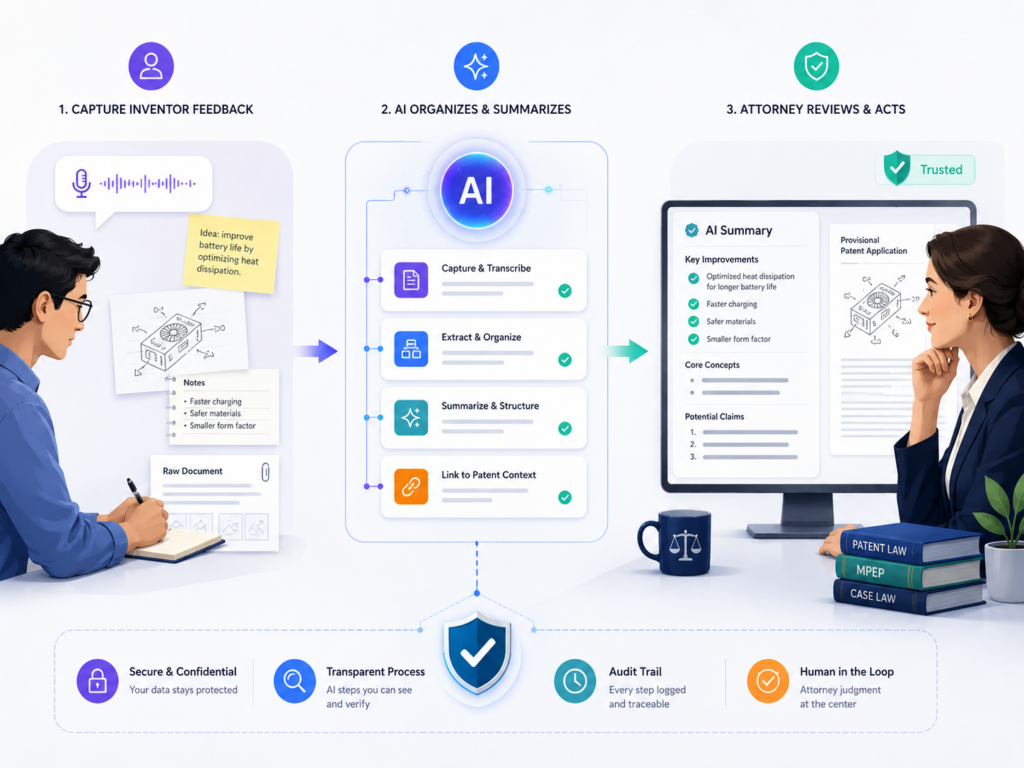
This is very important. A patent attorney is not just looking for a nice overview. They are looking for details that can support strong protection.
They need to know who contributed, what changed, how the system works, and what the invention may improve. If AI creates a smooth summary but hides the source, that creates more work, not less.
The workflow should make review easy. It should show the attorney what the inventors said, where the information came from, and which points need follow-up. It should also avoid big claims unless the inventors gave facts to support them.
Start with a controlled input set
A strong AI workflow starts before the prompt. It starts with the input. If you feed AI a messy pile of unrelated notes, the result will often be vague. If you feed it a focused set of inventor feedback, the result will be much better.
The team should gather the most relevant material for one invention or one technical improvement. This may include meeting notes, engineer comments, design docs, demo notes, customer feedback, and code comments.
The point is not to include everything the company has ever written. The point is to include enough material to help AI understand the invention area.
Once the input is set, the AI should be told to summarize only what appears in the material. It should not invent missing details.
It should not guess how the system works. It should not turn a small feature into a broad invention without support.
Make source tracking part of the summary
Every important statement in the AI summary should be traceable. The attorney should be able to see where the point came from. This can be done with links, file names, timestamps, comment IDs, or short references to the source material.
Source tracking matters because inventor feedback is not always clean. Two engineers may describe the same feature in different ways.
A founder may explain the goal, while the engineer explains the method. A product doc may use old terms that changed later. When the attorney can see the source, they can sort out these differences faster.
This also helps the inventors review the summary. If someone says, “That is not what I meant,” the team can go back to the original comment and fix the summary before it goes too far.
Use AI to create a review-ready brief, not a final answer
The best output is not a finished patent draft. The best output is a review-ready invention brief. That brief should help the attorney understand the invention quickly and decide what to ask next.
The brief should explain the problem, the old way, the new approach, the main steps, the system parts, the data used, the result, the inventor names, and the open questions. It should also show any places where the feedback conflicts or feels unclear.
This is practical because it turns a messy review process into a sharper conversation.
Instead of starting with “Tell me about the invention,” the attorney can start with, “I see the key change may be the second-stage model trigger. Is that correct?” That saves time and improves the quality of the discussion.
The attorney should stay in control of the legal work
AI can organize facts, but the attorney should guide the legal strategy. That includes deciding what may be claimed, how broad or narrow the filing should be, what prior art may matter, and how to frame the invention for the patent office.
This is where founders need to be careful. AI may sound confident even when it is wrong.
It may also miss a key issue because it does not understand the business plan, the competitive landscape, or the deeper patent strategy. A human attorney brings judgment that software should not replace.
PowerPatent is built for this balance. It uses smart software to reduce busywork, but real patent attorneys review and guide the process.
That means founders get speed, structure, and legal oversight in one workflow. Learn more here: https://powerpatent.com/how-it-works
Ask AI to Find What Changed, Because Change Often Points to the Invention
Patent attorneys care a lot about what is new. In a startup, what is new often shows up as a change. The team changed how the model chooses data. The backend changed how it handles failures.
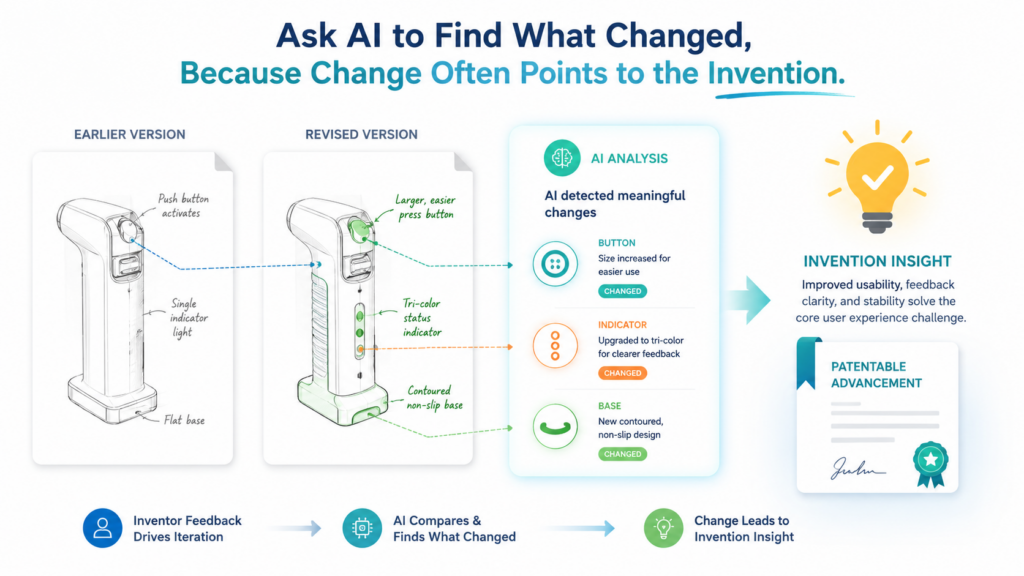
The device changed how it measures a signal. The workflow changed how human review is triggered. The user experience changed because the system now makes a smarter decision in the background.
Inventor feedback often describes these changes in casual words. Someone says, “We fixed the slow part.” Someone else says, “Now it adapts before the bad result happens.”
Another person says, “This is different from our first version because it checks the signal twice.” These comments may look small, but they can point to the heart of the invention.
AI can help by comparing feedback over time. It can read older notes and newer notes, then summarize what changed.
This is one of the most useful ways to prepare material for a patent attorney because it shows the path from problem to solution.
Compare the old approach with the new approach
A strong AI summary should not only describe the current system. It should explain what came before. The old approach gives context. It shows why the new work matters.
For example, a startup may have first used a simple rule-based process. Later, the team built a system that changes the rule based on live data.
That change may be more important than the final feature itself. Without the old approach, the attorney may not see the real invention.
AI can be prompted to create a clear before-and-after summary. It should explain how the system used to work, what failed or fell short, what was changed, and what result the change produced.
This helps the attorney ask better questions and spot patentable ideas more quickly.
Do not hide failed paths, because they often explain the breakthrough
Inventors sometimes leave out failed attempts because they think only the final solution matters. But failed paths can be very useful. They show why the final solution was not obvious inside the team’s own work.
AI can summarize failed attempts in a clean way. It can show that the team tried a simple model, a fixed rule, a manual review step, or a standard workflow, but those options did not solve the problem. Then it can explain the final change that worked.
This does not mean every failed path belongs in a patent filing. The attorney will decide what matters. But giving the attorney that background can make the invention easier to understand and may help shape a stronger strategy.
Look for the technical reason behind the business win
Founders often describe invention value in business terms. They say the product is faster, cheaper, safer, more accurate, easier to use, or better for customers. Those outcomes are useful, but the attorney needs to know the technical reason behind them.
AI can help translate business feedback into technical questions. If the founder says, “This reduced review time by half,” AI should ask what changed in the system to cause that.
Did the model remove low-value cases? Did the system group similar items? Did it change the order of review? Did it add a confidence score? Did it route edge cases to a different process?
That technical reason is often where the invention lives.
The best summaries connect outcome to mechanism
A weak summary says, “The invention saves time.” A better summary says, “The system saves time by grouping similar cases, scoring their risk, and sending only the highest-risk cases to human review.” The second version gives the attorney something concrete.
This is why AI should be used as a bridge between product language and technical language. It should not make the writing complex. It should make the cause and effect clear.
PowerPatent helps startups bring these pieces together without forcing founders to become patent experts.
The software helps structure the invention story, and attorney oversight helps turn that story into a stronger filing path. See how PowerPatent supports founders here: https://powerpatent.com/how-it-works
Use AI to Turn Inventor Feedback Into Better Attorney Questions
One of the best uses of AI is not summarizing. It is helping the patent attorney ask better questions. A good question can unlock the whole invention.
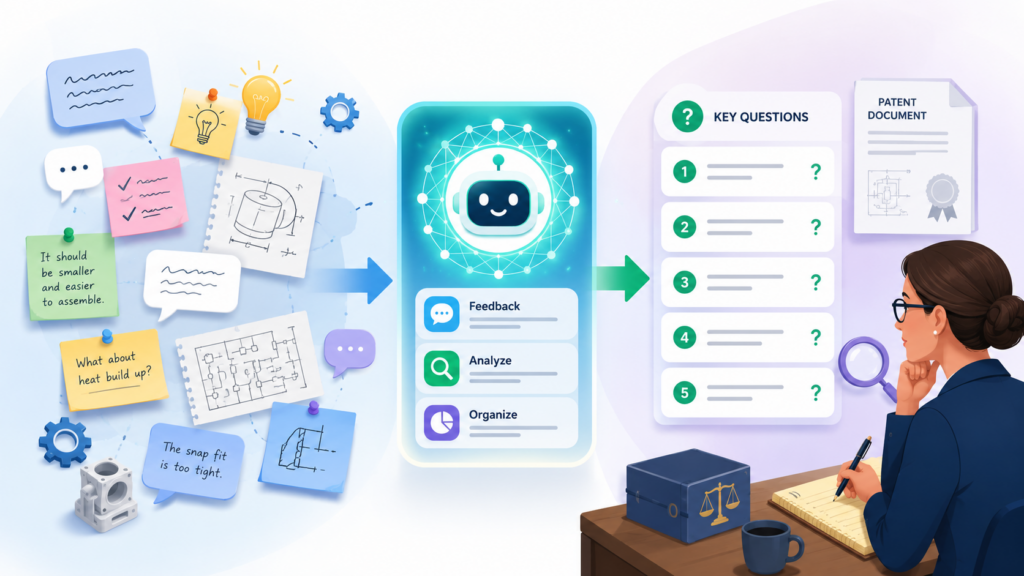
It can turn a vague idea into a clear technical feature. It can reveal that a small design choice is actually the reason the product works.
Inventors often do not know what to explain unless someone asks. They may leave out the hard part because they assume it is obvious.
They may describe the final result but not the steps that make it happen. They may talk about customer value while skipping the system design.
AI can read inventor feedback and produce a set of focused follow-up questions for the attorney. These questions should not be generic. They should be tied to the exact feedback the inventors gave.
Questions should target missing technical facts
A bad AI question sounds like this: “Please explain the invention in more detail.” That is too broad. It makes the inventor do all the work.
A good AI-assisted question sounds more focused. It might ask what signal triggers the second model, how the system decides the signal is weak, whether the fallback path is automatic, what data is used in the second check, and whether the process changes for different user types.
This kind of question helps the inventor answer faster. It also helps the attorney get the facts needed for a stronger draft.
Questions should separate required steps from optional steps
This is a key part of patent work. Some steps are required for the invention to work. Other steps are helpful but optional. Inventors may mix these together when they explain the system.
AI can help flag places where this needs review. For example, if the feedback says the system uses a confidence score, a human review queue, and a dashboard alert, the attorney may need to know which parts are essential.
Is the confidence score required? Is human review always needed? Is the dashboard just one way to show the result?
This matters because optional details may narrow the invention too much if they are treated as required. The attorney needs this information to make smart choices.
AI should help create a sharper inventor interview
Inventor interviews are much better when the attorney walks in with a clear map. AI can help build that map. It can summarize the likely invention, show open questions, identify unclear terms, and highlight possible claim areas.
This does not replace the interview. It improves it. The attorney can spend less time gathering basic context and more time testing the invention.
They can ask about edge cases, alternate versions, system boundaries, and competitor workarounds.
For startups, this saves time. Engineers do not want to sit through long calls that feel unfocused.
Founders do not want the patent process to slow down the product roadmap. A sharper interview respects everyone’s time.
Better questions create better patents
Strong patents come from clear details. Clear details often come from strong questions. AI can help prepare those questions, but the attorney should decide which questions matter most and how to use the answers.
The best workflow is simple. AI reads the feedback. AI drafts the questions. The attorney reviews and improves them.
The inventors answer. AI organizes the answers. The attorney uses judgment to shape the filing.
PowerPatent is designed to make this process faster and cleaner. It helps teams capture invention details, organize them, and work with real patent attorneys who know how to turn those details into action. Explore the process here: https://powerpatent.com/how-it-works
Teach AI to Spot Conflicts, Gaps, and Weak Spots in Inventor Feedback
Inventor feedback is rarely perfect on the first pass. One person may say the system uses live data. Another may say it uses stored data. One note may say the model runs before user input.
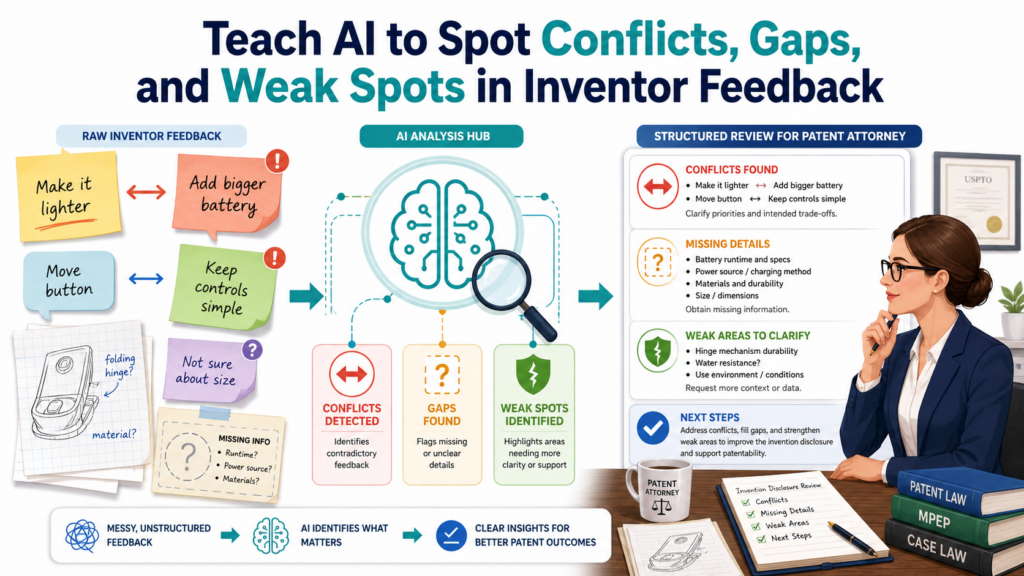
Another may say it runs after user input. A founder may describe the feature as automatic, while an engineer says there is still a manual step.
These differences are not bad. They are normal. But they need to be found early. If they are not found until the drafting stage, the patent attorney has to stop and untangle the facts. That slows everything down.
AI is very useful here because it can compare many comments at once and flag places that do not line up. It can show the attorney where the story is strong and where it needs review.
Ask AI to find unclear terms
Startups often use internal words that make sense to the team but not to an outside reader. The team may say “smart routing,” “trust layer,” “review engine,” “agent memory,” or “auto-check.”
Those terms may be useful inside the company, but the attorney needs to know what they mean in plain technical terms.
AI can scan inventor feedback for terms that are vague, undefined, or used in different ways. It can then ask the team to define them. This is a simple step, but it can prevent major confusion later.
For example, if three inventors use the phrase “confidence score,” AI should check whether they mean the same thing.
Does the score measure model accuracy? User risk? Data quality? Fraud chance? Completion likelihood? A single phrase can hide many different meanings.
Clear terms help the attorney protect the right thing
When terms are clear, the attorney can do better work. They can understand the system faster. They can ask sharper questions. They can avoid writing around the wrong idea.
This is especially important for AI, software, robotics, biotech tools, data systems, and other deep tech work.
Small wording differences can change the meaning of the invention. A vague term may sound fine in a meeting, but it may not be enough for a strong patent story.
AI can help clean this up before the attorney spends time drafting.
Ask AI to find missing links in the invention story
A strong invention story has a chain. There is a problem. There is a technical cause of the problem. There is a solution. There are steps or parts that make the solution work. There is a result. There may also be alternate versions.
Inventor feedback often skips one or more parts of this chain. The founder may explain the result but not the cause.
The engineer may explain the code path but not the user problem. The product lead may explain the pain point but not the technical fix.
AI can find these gaps. It can say that the feedback explains the result but not the trigger. It can say that the feedback names the model but does not explain the training data.
It can say that the feedback mentions a fallback path but does not show when it starts or ends.
Gap-finding should happen before drafting starts
The earlier the team finds gaps, the easier they are to fix. Inventors can answer while the work is fresh. The attorney can review a cleaner file. The company can move faster.
This also lowers the risk of filing something too thin. A thin invention summary can lead to a weak draft, missed claim angles, or extra back-and-forth. Founders may think they are saving time by sending less detail, but they often create more delay later.
PowerPatent helps teams avoid that trap by making invention capture more structured from the start.
The platform helps organize feedback so attorneys can focus on strategy, not cleanup. See how it works here: https://powerpatent.com/how-it-works
Use AI to Create a Clear Timeline of the Invention
A patent attorney needs more than a final description. They often need the path of the invention. They need to know when the idea started, when it changed, who added what, and what version became real.
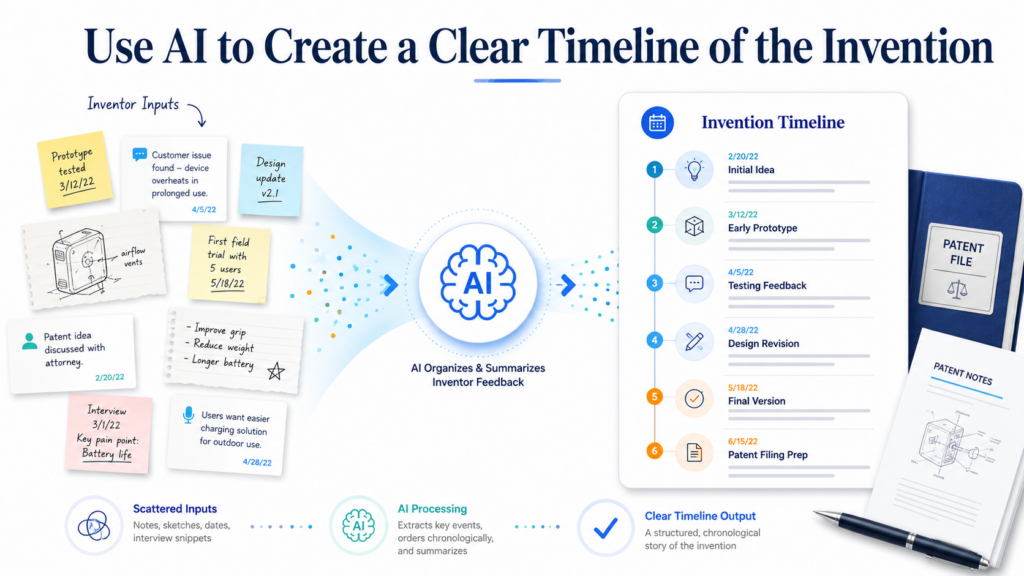
This timeline helps the attorney understand the invention with more care. It also helps the startup avoid confusion later.
Inventor feedback usually does not arrive in order. A Slack thread may explain an early problem. A product note may show a new customer need. A GitHub comment may reveal the exact fix.
A meeting transcript may show why the team changed direction. A demo recording may show the final working version. If these pieces stay scattered, the attorney has to rebuild the story by hand.
AI can help by turning scattered feedback into a clean invention timeline. This does not mean AI should decide legal dates or make legal claims.
It simply means AI can organize the record so the attorney can review it faster. The value is clarity. The attorney can see the invention grow from problem to test to working solution.
The timeline should show how the idea changed over time
A useful timeline does not just list dates. It explains what changed at each point. The first note may show the team had a problem.
The next note may show the team tried a simple fix. Later feedback may show the simple fix failed. Then a design doc may show the new technical path that worked.
This kind of timeline helps the attorney see the invention as a moving story. It shows the hard parts. It shows the choices. It shows the moment where the team stopped doing the old thing and created a better way.
For example, a startup may begin with a model that scores all user actions in the same way. Later, the team may notice the model performs poorly when data is missing or delayed.
Then the team may add a separate check that detects weak input before the score is made. Finally, the team may route weak cases through a different process.
The final invention may not be “scoring user actions.” It may be the special way the system handles weak input before scoring.
A good timeline protects the details that busy teams forget
Fast teams forget small choices because they move on. But those small choices may matter. The team may forget that it first tried a fixed threshold and later replaced it with a live threshold.
It may forget that the first fallback path was manual, but the later version became automatic. It may forget why one data source was removed and another was added.
AI can help preserve these details by reading old notes and pulling out the sequence. The timeline should be written in plain words.
It should not try to sound legal. It should say what happened, what changed, and what evidence supports each point.
This helps the attorney ask better follow-up questions. It also helps inventors review the history without digging through months of old files.
The timeline should connect people to contributions
Inventorship is not something AI should decide. That is for the attorney to assess. But AI can help gather contribution facts. It can show which people gave feedback, what they said, and where their ideas appear in the invention record.
This is useful because many startup inventions are built by teams. One engineer may design the model flow. Another may define the data filter. A founder may identify the technical problem from customer use.
A product lead may shape the workflow that makes the system useful. The attorney needs the facts before making any inventorship judgment.
AI can create a contribution map in simple language. It can say that one person described the failure signal, another described the second-stage check, and another explained how the system routes cases after the check.
This does not mean all of them are inventors. It means the attorney has a better starting point.
Contribution summaries should stay neutral
AI should not say, “This person is the inventor.” That is too far. It should say, “This person provided feedback about this part of the system.” That is safer and more useful.
Neutral summaries help the attorney review the facts without being boxed in by AI’s wording. They also help the company stay careful.
When teams let AI make legal-sounding conclusions, they create avoidable risk. When teams use AI to organize facts, they create speed and control.
PowerPatent is designed for this kind of clean handoff. It helps founders collect the invention story, organize it, and work with real patent attorneys who can review the facts with care. See how it works here: https://powerpatent.com/how-it-works
Use AI to Separate Product Feedback From Patent-Relevant Feedback
Not all inventor feedback is patent feedback. Some notes explain customer needs. Some notes describe the user interface.
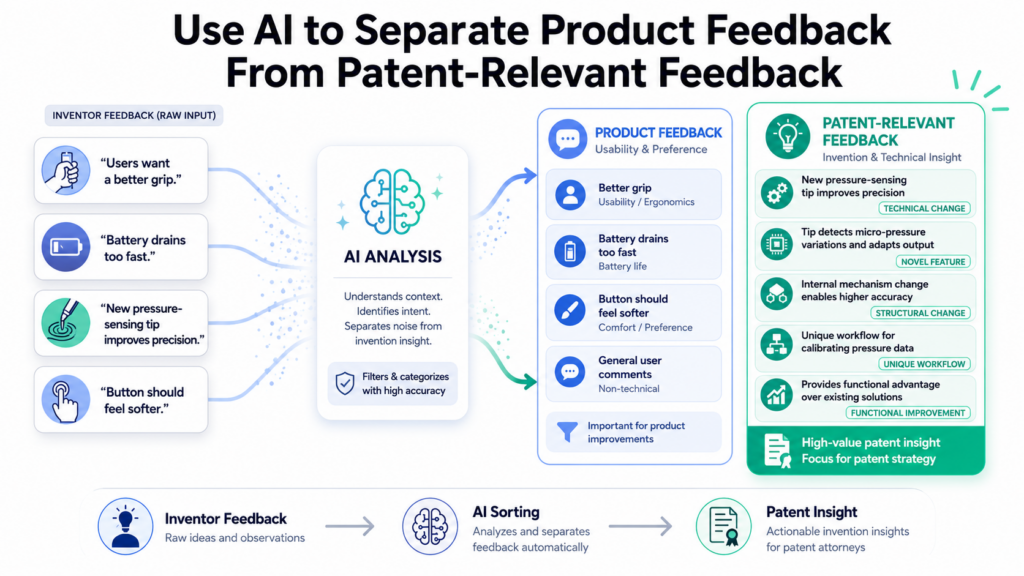
Some notes explain a bug. Some notes describe a business goal. Some notes point to the real invention. The hard part is knowing which is which.
AI can help sort feedback without forcing founders or engineers to become patent experts. It can read the raw notes and group them into practical categories.
It can show what looks like product feedback, what looks like technical detail, what may need attorney review, and what is only background.
This is powerful because patent attorneys need the technical core. They need to know how the invention works, not only why customers like it.
A founder may say, “Users can now finish onboarding in two minutes.” That is a great product result. But the attorney needs to know what system change made that possible.
Product value matters, but it is not the full invention
Product feedback often explains why the invention matters. It may show that the new system saves time, reduces mistakes, improves accuracy, lowers cost, or makes a hard workflow easier. That is useful context.
But product value alone is not enough. The attorney needs the mechanism. They need the steps, the parts, the data flow, the trigger, the model behavior, the device action, or the control process that creates the value.
AI can help by taking product feedback and asking what technical change sits under it. If the feedback says users make fewer errors, AI can ask what prevents the errors.
If the feedback says the process is faster, AI can ask what step was removed, changed, or automated. If the feedback says the system works better on messy data, AI can ask how the system detects and handles that messy data.
The key move is to trace every benefit back to a technical cause
A strong summary should connect each major benefit to the technical cause behind it. This keeps the attorney focused on the real invention.
For example, “The tool improves review speed” is too thin. “The tool improves review speed by grouping similar records, ranking them by risk, and showing the reviewer only the items that cross a live threshold” is much better. It gives the attorney a path to explore.
AI should be trained, through prompts and review, to make this connection every time. The point is not to make the summary longer. The point is to make it more useful.
AI should mark background details clearly
Inventor feedback often includes background details that help explain the market or product, but do not describe the invention itself.
These may include customer complaints, sales notes, support issues, and broad product goals. These details can still matter, but they should not be mixed into the technical summary as if they are invention steps.
AI can label background details in a simple way. It can say that a customer pain point explains the reason for the work, but does not explain the technical solution.
It can say that a design note shows user flow, but not system logic. It can say that a business goal may be useful context, but needs a technical explanation.
This keeps the invention brief clean. It also helps the attorney spend time on the strongest material first.
Clean separation makes the attorney review faster
When product feedback and technical feedback are mixed together, the attorney has to untangle them. That slows down the process. It can also cause the team to focus on the wrong thing.
When AI separates them, the attorney can quickly scan the technical core, then use the product context to understand why the invention matters. This leads to better questions and a better patent strategy.
PowerPatent helps founders turn product progress into patent-ready invention stories without getting buried in process.
The platform brings structure to the messy parts, while real attorneys guide the important decisions. Learn more here: https://powerpatent.com/how-it-works
Use AI to Make Inventor Feedback Easier for Attorneys to Review
Patent attorneys are trained to find the key idea inside messy technical facts. But that does not mean founders should hand them a pile of raw notes and hope for the best. The better the input, the better the attorney can use their time.
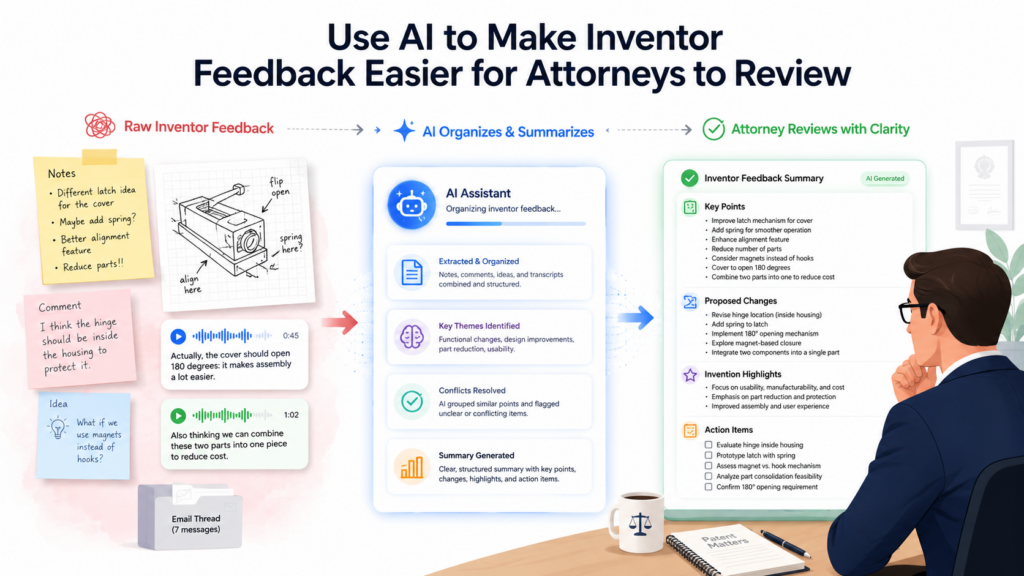
AI can help turn inventor feedback into a review-ready format. This is not about making the work look pretty. It is about making it easier to inspect.
The attorney should be able to read the summary and quickly understand the invention area, the main technical change, the likely value, the supporting facts, and the open issues.
This matters because a patent project has many moving parts. The attorney may need to understand the invention, compare it to known approaches, draft claims, review drawings, ask follow-up questions, and guide the filing plan. If the first handoff is weak, every later step gets harder.
A review-ready summary should be clear, sourced, and honest
The best AI summary is not the most polished one. It is the one that helps the attorney trust what they are reading. It should avoid hype. It should avoid broad claims that are not backed by inventor comments.
It should avoid phrases like “revolutionary,” “unique,” or “first of its kind” unless the attorney has reviewed and confirmed the basis for that type of statement.
Instead, the summary should use simple words. It should say what the team built, what problem it addresses, how it works, and what proof or feedback supports that understanding. It should also mark uncertain areas clearly.
For example, if the notes suggest that the system uses live data, but one comment says the data may be stored first, the summary should flag that.
It should not smooth over the conflict. Good attorney review depends on seeing the rough edges early.
Honesty beats polish every time
A patent attorney does not need AI to make the invention sound impressive. They need AI to make the facts easier to review.
A polished but vague summary can waste time. A plain, honest, well-organized summary can save time.
This is also better for founders. When the summary is honest, the team can fix gaps before they become drafting problems. Inventors can correct errors. The attorney can focus on the right issues. The filing path becomes cleaner.
The best summaries are often direct. They say, “The feedback shows that the team changed the routing process when a confidence signal drops below a threshold.
The exact threshold logic still needs inventor review.” That kind of sentence is useful because it is clear and careful.
The summary should make open questions easy to answer
Open questions should not be buried at the bottom of a long document. They should be tied to the exact part of the invention they affect.
If the summary describes a fallback path, the open question should ask when that fallback starts, what data it uses, and whether it is required in every version.
AI can help create these questions from the feedback itself. It can look for missing details, unclear terms, and possible conflicts. Then it can write questions that are easy for inventors to answer.
This is one of the fastest ways to improve the patent process. Instead of asking inventors to explain everything again, the attorney can ask targeted questions that fill the real gaps.
The review should lead to action, not more confusion
A good AI summary should end with clear next steps for review. The attorney should know what to confirm. The inventors should know what to answer. The founder should know whether more technical input is needed.
The output should feel like a working brief, not a final legal document. It should move the team forward.
That is the kind of practical speed PowerPatent is built to support. The software helps organize invention details so founders are not stuck in blank-page mode, while attorney oversight keeps the process grounded. See the founder-friendly workflow here: https://powerpatent.com/how-it-works
Use AI to Preserve Technical Depth Without Making the Summary Hard to Read
A common fear is that simple writing will make the invention sound too basic. That does not have to happen.
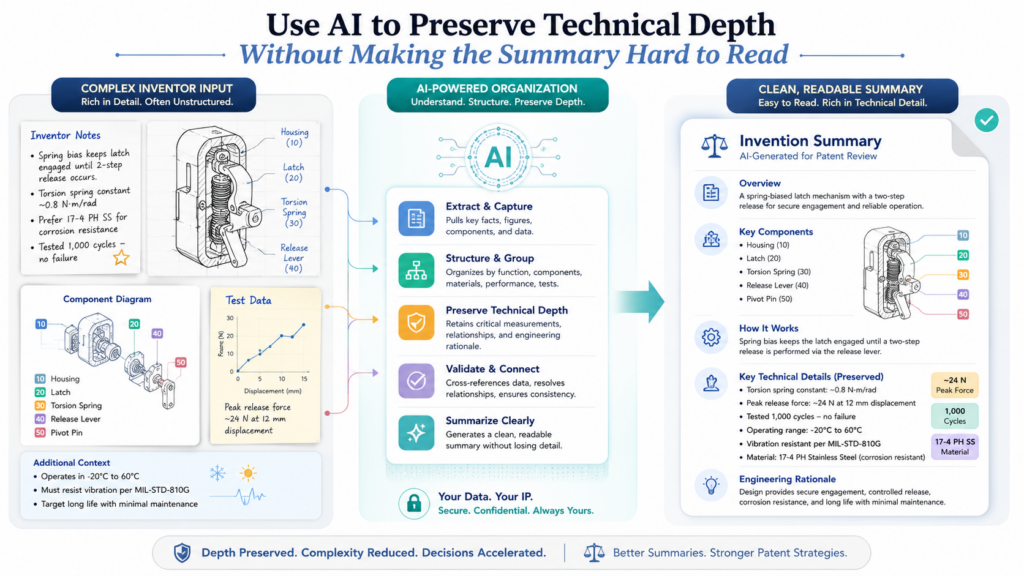
The best patent summaries use simple words but keep the technical depth. The goal is not to dumb down the invention. The goal is to make the hard parts clear.
AI can help with this if it is guided well. It can take dense inventor notes and rewrite them in a way that a busy attorney can scan quickly. But the AI must keep the actual steps, system parts, data signals, and decision points intact.
This is where prompt quality matters. If the prompt says, “Make this short and simple,” AI may remove the most important details.
A better instruction is, “Make this easy to read, but do not remove technical steps, conditions, inputs, outputs, or system behavior.” That tells AI to simplify the language, not the invention.
Plain language should still show how the system works
A strong summary should explain the system like a smart engineer talking to a busy attorney. It should not hide behind jargon. It should not use broad labels when a clear explanation is possible.
For example, instead of saying “The platform uses a novel AI orchestration layer,” the summary should say what that layer does.
It may say the system chooses which model to use based on the user’s input type, the confidence score, and the cost of running each model. That is much clearer.
The attorney can work with that. They can ask whether the selection process is new, whether the confidence score is calculated in a special way, and whether cost-aware model routing is part of the invention.
The best summaries explain the decision points
Many software and AI inventions live in decision points. The system checks a condition. It chooses a path.
It changes behavior based on a signal. It updates a score. It sends a case to a human. It stops a process when risk is high. It retries when data is weak.
Inventor feedback may mention these points casually. AI should pull them forward. A summary that says “The system improves accuracy” is weak.
A summary that says “The system runs a second check only when the first score is below a set confidence level” is much stronger.
Decision points help the attorney understand structure. They also help reveal alternate versions. The system may use a threshold, a score range, a rule, a learned model, or a human review flag. Each version may matter.
Do not let AI replace exact technical words when they matter
Simple language is good, but some technical words should stay. If the team uses terms like vector embedding, sensor fusion, edge inference, model drift, token limit, latency budget, or anomaly score, the AI should not always replace them with broad words. It should explain them in plain language while keeping the exact term where useful.
This gives the attorney both readability and precision. The summary can say, “The system uses vector embeddings, which are number-based representations of text, to compare user requests with stored examples.” That is simple, but still technically grounded.
This style is especially useful for deep tech startups. The attorney may need the exact terms to understand the invention area, but the broader team may need simple explanations to review the summary.
Clear technical writing helps founders stay involved
Founders should not feel lost during the patent process. When the invention brief is easy to read, founders can spot mistakes faster.
Engineers can confirm technical points faster. Product leaders can add missing context. The attorney gets better input.
This creates a better loop. AI organizes the feedback. The team reviews it. The attorney guides the strategy. The filing improves.
PowerPatent gives founders a way to keep that loop moving without turning patent work into a drag on the company.
It brings smart software and real attorney review together so teams can protect hard work with more speed and less stress. Learn how it works here: https://powerpatent.com/how-it-works
Use AI to Prepare Inventor Feedback for Claim Strategy Without Writing Claims Too Early
Claims are the heart of a patent. They define what the patent is trying to protect. But that does not mean AI should jump straight into writing claims from raw inventor feedback. That is usually too early.

Before claims, the attorney needs a strong understanding of the invention. They need to know the technical core, the possible variations, the required parts, the optional parts, and the ways a competitor might design around the idea. AI can help prepare this thinking, but the attorney should lead the claim strategy.
This is a very useful middle ground. AI can organize inventor feedback in a way that makes claim thinking easier. It can show possible invention angles. It can group technical features.
It can identify alternate versions. It can point out unclear limits. But it should not present its output as final claim language.
AI can help find the main protection angles
Inventor feedback often contains more than one possible protection angle. A single product feature may include a data collection method, a model selection process, a user routing workflow, a training method, a device control step, and a dashboard output.
Some of these may be central. Some may be supporting details. Some may be better saved for another filing.
AI can help by grouping the feedback around these different angles. It can say that one group of comments relates to data handling, another relates to model choice, another relates to feedback loops, and another relates to user review. This gives the attorney a clearer map.
The attorney can then decide which angle is strongest, which one fits the business plan, and which one should be explored first.
The best angle is often the one competitors would need to copy
Founders should think about patents with the market in mind. The question is not only, “What did we build?” It is also, “What part would a competitor want to copy if this works?”
AI can help surface this by looking at inventor feedback and asking where the company’s advantage comes from. Is it the data pipeline?
The way the system handles edge cases? The way models are selected? The way results are ranked? The way a device changes action based on sensor input?
This does not replace attorney judgment. It helps the attorney see where the business and technical value may meet.
AI should help describe variations before the filing path narrows
Inventors often explain only the version they built first. But a patent attorney may want to know other versions that could also work.
This is important because a patent that only covers the first version may be too easy for others to avoid.
AI can help ask about variations. If the current system uses one threshold, could it use many thresholds? If it uses a machine learning model, could it use rules in some cases? If it sends results to a dashboard, could it send them to an API, device, or workflow queue? If it uses text input, could it also use image, audio, sensor, or log data?
These questions help the attorney understand the invention’s range. They also help the team avoid describing the invention too narrowly at the start.
Variation mapping should be careful and grounded
AI should not invent versions that the team has never thought about and present them as real. That creates risk. Instead, AI should mark possible variations as questions for inventor review.
For example, the summary might say, “The current feedback describes a fixed threshold. Please confirm whether the same process could use a changing threshold based on live data.” That is useful and honest.
This helps the attorney build a stronger strategy while keeping the facts clean.
PowerPatent helps teams move from raw inventor feedback to attorney-ready invention material in a structured way. The goal is not to replace expert judgment.
The goal is to give attorneys better inputs and give founders a faster, clearer path to protection. Explore the process here: https://powerpatent.com/how-it-works
Use AI to Make Inventor Reviews Faster and Less Painful
Inventor review is one of the most important parts of the patent process, but it can also be one of the slowest.
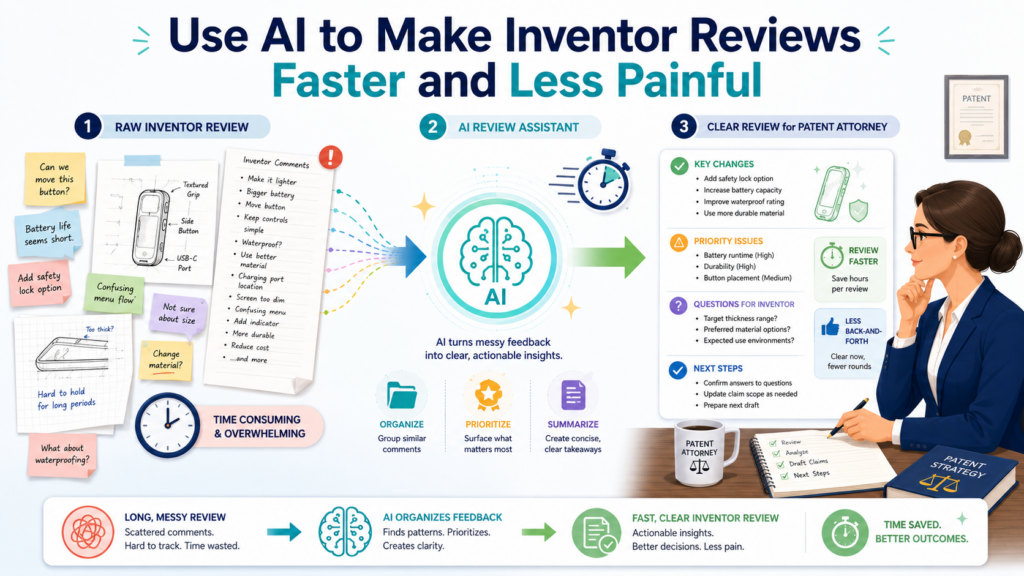
Inventors are usually busy building, selling, fixing bugs, talking to customers, hiring, testing, and shipping. Patent work can feel like a hard stop in the middle of all that motion.
AI can make inventor review easier by turning long feedback files into clear review packets.
The inventor should not have to read through a messy transcript, five old threads, three product notes, and a rough technical brief just to answer one question. AI can pull out the exact part that needs review and show it in plain words.
This helps the attorney too. Instead of sending broad questions and waiting for scattered answers, the attorney can send a focused review request. The inventor can confirm, correct, or add detail faster. The whole process becomes lighter.
The review packet should be built around decisions
The best review packet does not ask the inventor to “review everything.” That is too much. It asks the inventor to make clear decisions.
Is this technical summary correct? Is this step required? Is this term used the right way? Is this result caused by the stated method? Are these alternate versions possible? Is this person’s contribution described fairly?
AI can help shape the packet around those decision points. It can pull the summary, the source note, and the open question into one small review section. That way, the inventor does not have to search for context.
This is a big deal for engineers. They are more likely to respond when the request is clear and specific. A vague request feels like extra work. A focused request feels manageable.
Small review tasks get better answers
When inventors get a giant document, they often skim. That is human. When they get a short, focused section tied to one technical point, they are more likely to give a useful answer.
AI can split the review into small parts without losing the full picture. One part may cover the trigger condition.
Another may cover the data source. Another may cover the model path. Another may cover edge cases. Another may cover alternative versions.
The attorney can then review each answer and decide what matters. This is much better than asking for one long free-form response and hoping it covers everything.
AI should help inventors correct the summary without rewriting it from scratch
Inventors should not have to become patent writers. Their job is to provide the facts. AI can make that easier by giving them a draft summary to mark up.
A good review prompt might ask the inventor to correct wrong statements, add missing steps, define unclear terms, and flag anything that sounds too broad. This lets the inventor react to something concrete.
For example, the AI summary may say, “The system routes low-confidence cases to human review.” The inventor may correct it by saying, “Not always. It first tries a second automated check.
Human review only happens if the second check also fails.” That correction may be very important. It reveals another step in the invention.
Corrections often reveal the best details
Many of the best invention details come out when an inventor pushes back. They say, “That is not exactly right,” and then explain the real method. AI should make that pushback easy.
The workflow should welcome corrections. It should not treat the first AI summary as final. In fact, the first summary is often most useful because it gives inventors something to fix. That fix can make the attorney’s job much easier.
PowerPatent helps teams build this kind of loop. The software can help organize and refine invention feedback, while real attorneys guide the review and strategy.
That means founders get a smoother process without losing the care that patent work needs. See how it works here: https://powerpatent.com/how-it-works
Conclusion
AI can make inventor feedback clearer, faster, and easier for patent attorneys to use, but only when it is handled with care. The goal is not to replace the attorney or let software make legal choices. The goal is to turn messy notes, calls, comments, and product changes into a clean story that shows what was built, why it matters, how it works, and what still needs review.
For founders and engineers, this means less wasted time and fewer missed details. PowerPatent brings smart software and real attorney oversight together so teams can protect what they are building with confidence: https://powerpatent.com/how-it-works